Re-Entrant Execution with the Registration Free COM.
Contents
Loading newly developed COM objects normally require registering them first in the Windows registry. This is no bueno for the offense. This post sheds some light on the process of Registration-Free COM loading. Then we walk through evading detection of LoadLibraryA GetProcAddress combo by bouncing off of Windows COM Runtime for re-entering the execution.
Non Registration-Free COM
Registration Free COM is a way to load COM objects from local filesystem without first registering them in the Windows registry. What does that even mean?
Well, a COM dll(or an exe), which is also called a COM server, is a binary interoperability technology which allows local clients to find and call on the functionality exposed by them at runtime by querying the Windows COM Runtime by specifying a program id (PROGID) or a Class ID (CLSID).
The client wishing to call on a known COM server functionality calls CoCreateInstance API, provides the CLSID descriptor, waits for Windows to do it’s magic, and then it is provided with a descriptor into the COM it wants to find, which the client can work with. There are a lot of pre-registered discoverable COM objects in the registry. For example, IE COM object is instantiated as follows:
|
|
where CLSID_InternetExplorer is {D5E8041D-920F-45e9-B8FB-B1DEB82C6E5E} CLSID.
Other examples are Office products, Oracle Forms, etc. Due to is binary ABI compatibility COM is quite a popular way of distributing functonality across Windows software realm.
The fact that a COM server is found lies in the fact that at some point someone had already registered it by invoking %systemroot%\SysWoW64\regsvr32 <full path of the COM DLL> on it. Once registered the COM is locked into an entry in one of the [COM Registration locations] (https://docs.microsoft.com/en-us/windows/win32/shell/app-registration).
Once the COM is registered Windows allows it to be found by client. Windows sets up a search and things work transaprent for the client from then on.
Registration-Free COM
The act of registration modifies the registry. This fact alone is not very optimal. Rights, unknown remote environment setups, policies, etc. have made the step of registration potentially an issue for software vendors wishing to distribute their products with COM components.
There is another a bit obscure way of making COM server known to the client: Registration Free COM. What this essentially means is that the registry is not written yet Windows is aware of the COM object and makes it known to the clients who are asking it for the service. How does this work?
There is a so called Side by Side DLL loading technique where an application specifies it’s runtime dependencies in a manifest file. Application Manifests are XML files that describe and identifies the shared and private side-by-side assemblies that an application should bind to at run time.
Registration Free COM technology finds use for this feature.
Application Manifest
Manifests are distributed in two ways: as a separate file named example.exe.<resource ID>.manifest or they can be embedded into the executable as a resource with mt.exe tool.
For the COM server to be known to Windows (and therefore to the application) applications can include comClass directives in the application manifest like so:
|
|
When applications initialize COM servers by CLSID Windows finds the COM descriptor in the manifest file (or parses the resource section of an exe) and loads COM into the memory space of the application without touching the registry.
Offensive COM
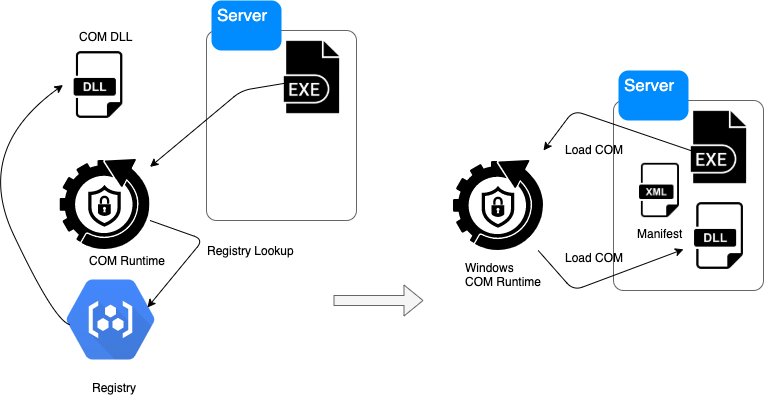 Registration-Free COM presents a couple of interesting cases for offensive operators.
First, the registry is not touched, which is good. Second, the manifest can be embedded into the application so there is no requirement for an additional file. The third property is even more interesting: the fact that a COM sever can be an exe as well as a dll.
Registration-Free COM presents a couple of interesting cases for offensive operators.
First, the registry is not touched, which is good. Second, the manifest can be embedded into the application so there is no requirement for an additional file. The third property is even more interesting: the fact that a COM sever can be an exe as well as a dll.
- We can avoid defense looking for
LoadLibraryAAPI in conjunction withGetProcAddresscombo to flag DLL load (file based) by loading COM instead with Windows assist. - We can avoid linear inspection of function calls in an application is we put a diversion barrier of COM loading escape into COM runtime executed by Windows itself, resuming at a different entry point (COM entry vs. DLL).
- We can ensure that an offensive executable is also a COM servers should it be used by other offensive chain.
To illustrate, we need to drop into some COM code. Notice the manifest can reference the same name as the executable (Server.exe):
|
|
So we load ourselves into our own memory as COM. Startup will look like so:
|
|
Where det is the COM server object with two exposed functions Detonate and EndDetonate.
The COM interface finds us a new entry point by exposing the COM IUnknown interface:
|
|
And then the Windows COM Runtime finds COM entry point defined in the Server.exe with exported known COM entry point:
|
|
Sever.exe is now the self launching exe and a COM DLL when needed to escape into Windows COM runtime and continue execution elsewhere.
Example of the technique: Github
Shout out to Kenny Kerr for his amazing explanation of COM, and some of his code this is based on.
Thanks for reading.